D-pad Focus Management Across TV Platforms
Model TV app focus as an explicit directional graph, preserve return state and test the same remote journeys across Android TV, tvOS and web TV runtimes.
The ugliest TV navigation bug usually looks harmless in a screenshot. Every card has a focus style, yet one press sends the highlight into the rail, traps it in a carousel or drops it entirely after Back. That's why TV app focus management starts with movement and state, not the glow around a poster.
Android's TV navigation guide describes the D-pad as the primary control and tells developers to test every visible control, scrolling list and selection path. Apple's tvOS focus documentation makes a similar point through its focus engine: the system chooses the next eligible item from the current layout and movement request. The APIs differ, but the debugging question is the same: where can focus move from here?
Draw the focus graph
Take one real screen and represent each focusable region as a node. Add a directed edge for Up, Down, Left and Right only where the move should succeed. Include the navigation rail, content rows, overlays and player controls. Ambiguity becomes obvious when two candidates occupy the same direction.
| State | Record it? | Failure it explains |
|---|---|---|
| Current focused element | Always | Lost focus and wrong movement |
| Selected item | When selection persists | Focus and selection being confused |
| Scroll position | For virtualized rows | Return lands on the wrong card |
| Last focused child | For grouped content | Re-entry starts at the first item |
| Overlay owner | While modal UI is visible | Focus escapes behind a dialog |
| Return target | Across screen changes | Back produces an arbitrary landing point |
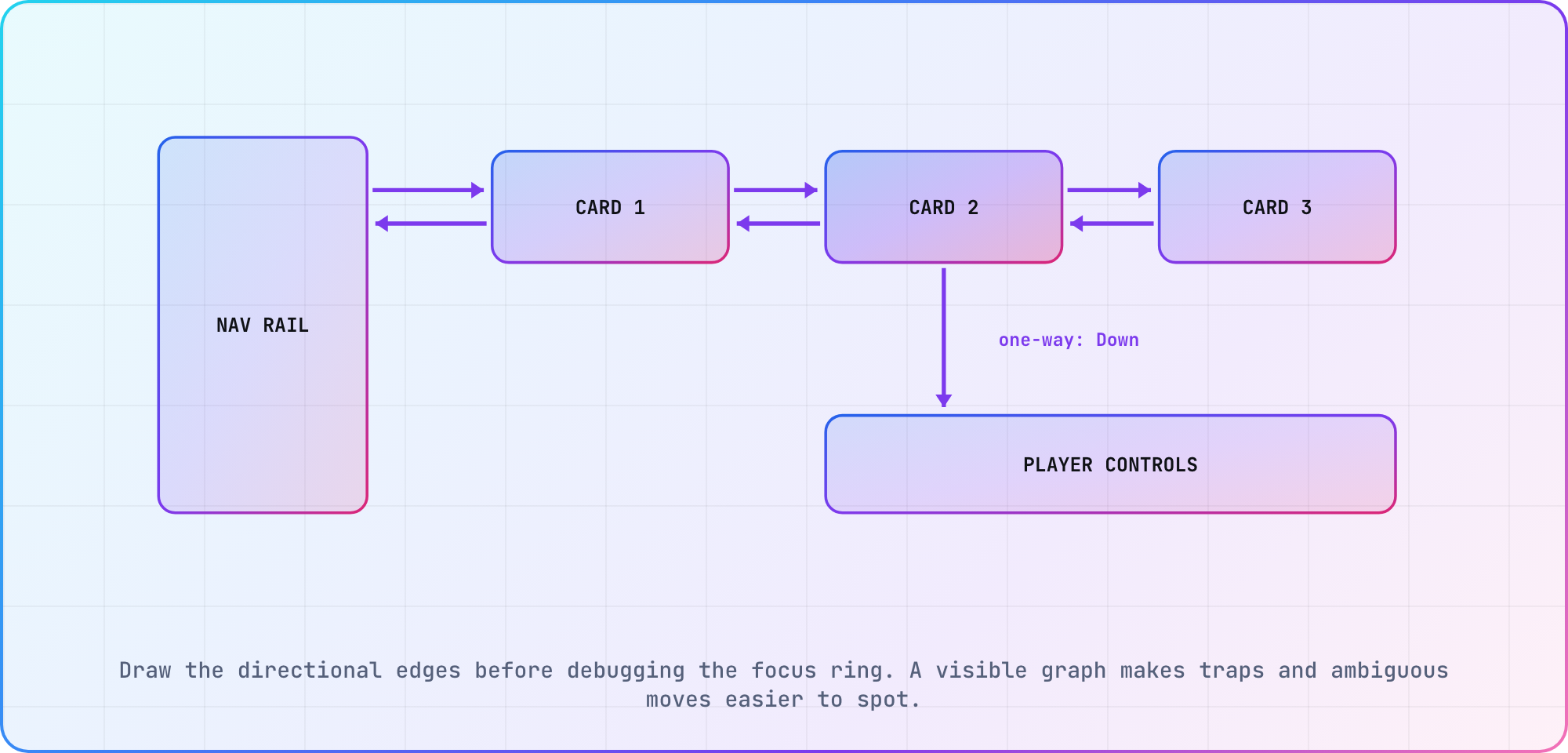
Illustrative graph derived from the directional-navigation behavior documented by Android and Apple.
I'd make the graph part of the screen review. It gives designers and engineers the same object to discuss, and it exposes decisions that a component-level unit test can't see.
Let the platform handle the ordinary path
On Android TV, the framework normally calculates directional navigation from the relative position of focusable elements. Google's guide recommends explicit nextFocus* attributes only when the generated route doesn't work, and in Compose the equivalent override is Modifier.focusProperties with up, down, left or right set to a FocusRequester. That restraint matters. A dense web of overrides becomes another navigation engine for your team to maintain.
Compose adds tools for grouping and restoring focus. Google's focus restoration guide documents focusRestorer, saveFocusedChild() and restoreFocusedChild() for returning to a prior child. Use them where a row or rail owns a stable return target, then test what happens when that item disappears from refreshed data.
On tvOS, UIKit's focus engine owns the actual focus update. Your app can mark eligibility, guide preferred focus and request an update, but Apple's UIKit documentation says there's no API for directly setting the focused item or moving focus in a particular direction. Treat that constraint as a useful design pressure. The layout and focus environment should make the intended move obvious. SwiftUI is looser here: setting an @FocusState value (tvOS 15 and later) moves focus to the matching view.
Web-based television runtimes add another wrinkle. Samsung's Tizen delivers the arrow keys, Enter and Back to your page as keydown events without registration, so your own key handling decides where focus goes. LG's Magic Remote adds a pointer, and LG's App Self Checklist makes both 4-way key control and on-screen cursor control mandatory. Keep the product-level graph stable, then implement and test each runtime's mechanism separately. The platform reference is a good place to keep the target matrix beside those results.
Separate focus, selection and scroll
A card can be selected without currently holding focus. A row can remember a scroll offset while its previous child no longer exists. A player overlay can own focus for ten seconds, then return it to content. Those are distinct states, even when a component library stores them close together.
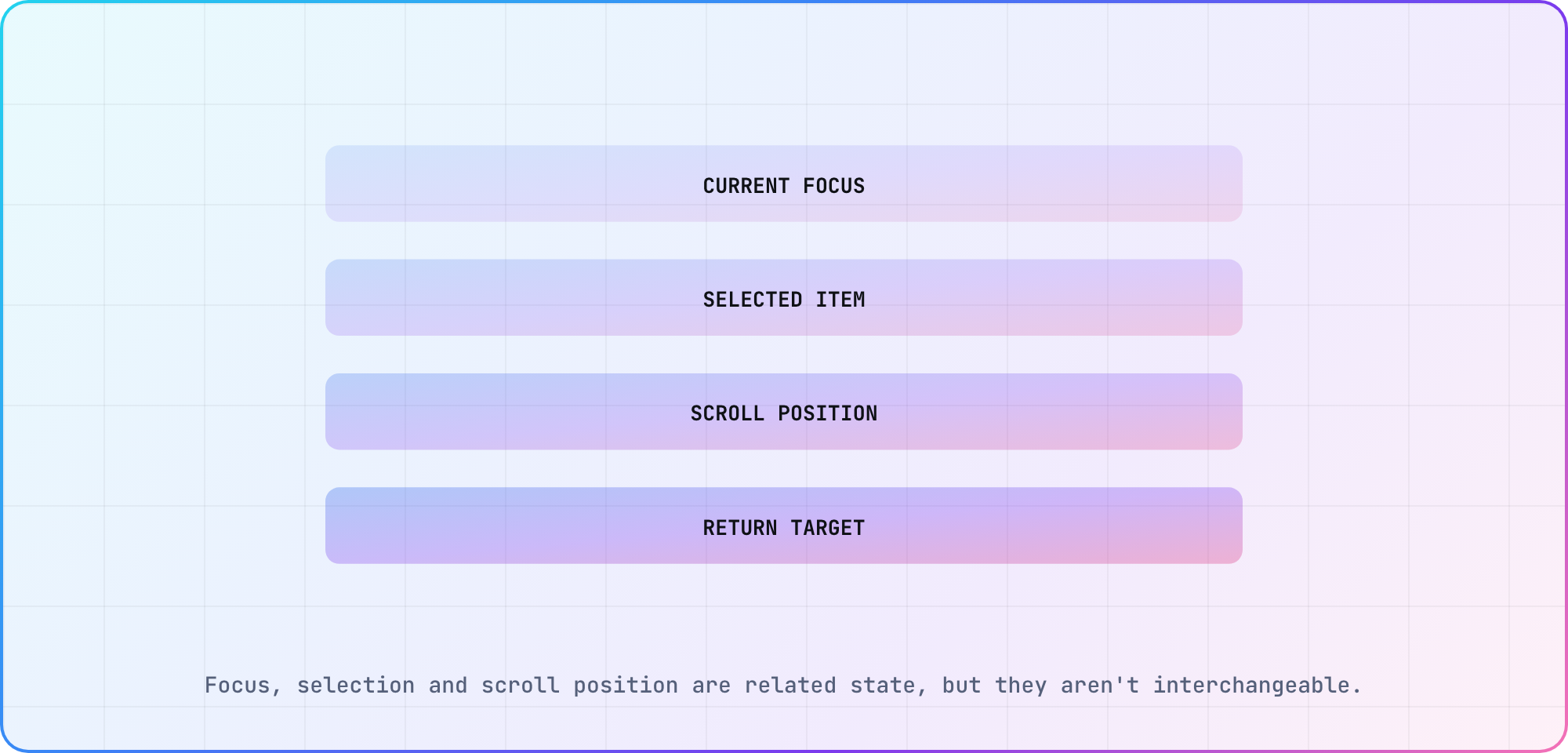
Illustrative state model for a browse-to-detail-to-back journey.
Name the states in logs. focus=movie-42, selected=movie-17 and return=rail-home tell you much more than "navigation broke." Avoid logging user data in identifiers; stable synthetic content IDs work fine for a test catalog.
Test journeys, not isolated arrow presses
A useful focus suite follows the way someone actually watches TV:
- Open a browse screen and confirm an actionable initial focus.
- Move through the first row, including both edges.
- Enter another region and return to the prior child.
- Open details, press Back and verify focus restoration.
- Open and dismiss an overlay without leaking focus behind it.
- Enter playback controls, let them hide, then reveal them again.
Run the same named journeys across the supported device matrix. The assertion can change by platform, but the product outcome should stay recognizable. Save a short video when a route fails because a log often captures the selected identifier without showing the surprising movement.
Handle disappearing targets
Personalized rows update. Entitlements expire. A card that owned focus before navigation may be absent when the user comes back. Define a fallback before this happens: nearest surviving sibling, row heading, or a known navigation item. "Whatever the framework picks" is difficult to explain and harder to test.
My preference is to keep fallback order close to the container that owns the children. That keeps a catalog refresh from reaching across the screen and choosing an unrelated control. Test empty, one-item and reordered lists, then record the outcome against the exact dataset fixture.
Focus feels simple when it works, which is why teams under-document it. A graph, four pieces of state and six repeatable journeys turn it into ordinary engineering work.
Frequently asked
What is TV app focus management?
TV app focus management is the logic that decides which control receives D-pad input, how that control looks and where focus returns after navigation. Treat it as directional state across screens and containers. A visible highlight is necessary, but it doesn't prove that every route is reachable or predictable.
Should I override every D-pad direction?
No. Start with the platform's normal directional search and test it on the real layout. Add explicit routes only where the calculated movement is wrong. Android's guidance says the same. Too many overrides create a second navigation system that can break whenever cards move or content changes.
How do I restore focus after pressing Back?
Save the child or stable content identifier before leaving the screen, then request restoration when the container returns. Define a fallback for removed or reordered content. On Compose, focusRestorer and the focused-child APIs support this pattern; other runtimes need an equivalent platform-specific implementation.
Is focus the same as selection?
No. Focus identifies the control that currently receives remote input. Selection represents a chosen tab, filter or item and can persist after focus moves elsewhere. Store and log them separately. Many confusing TV bugs come from using one boolean to stand in for both pieces of state.
What should a D-pad navigation test cover?
Cover initial focus, every visible control, row edges, movement between regions, selection, Back, overlays and focus restoration after data changes. Run journeys rather than isolated key presses. A short capture plus stable element identifiers usually gives enough evidence to reproduce a route that jumped or became trapped.
Do Android TV and tvOS use the same focus model?
They share the product idea of directional focus, but their frameworks differ. Android can calculate spatial movement and accept explicit next-focus routes. tvOS uses a system focus engine that evaluates eligible items. Keep one product graph, then implement and verify it with each platform's own primitives.
Keep reading
Remote Smart TV Testing Without a Local Device Lab
Compare remote smart TV testing by exact hardware coverage, interaction depth, private-network access and evidence capture, then keep a small local smoke kit.
Samsung Tizen TV Test Automation: Limits and Workarounds
Automate Samsung TV build, signing, install and evidence capture while keeping device focus and playback verdicts outside unsupported official UI automation.