BrightScript Tutorial: Read and Write Your First Roku Code
A BrightScript tutorial for developers learning Roku: understand types, arrays, functions and invalid values, with small examples and clear version checks.
A title arrives in a catalog response, and your Roku app needs to turn it into a label. That's where I'd start a BrightScript tutorial: turn an item into a label, then decide what happens when the item is missing. We can leave the screen layout until the language feels familiar.
The Roku BrightScript language reference documents both dynamic and declared types. That distinction is the thread we'll follow through these BrightScript examples. The snippets are documentation-based exercises, with invented catalog data; they haven't been executed on a Roku device for this article.
Read the syntax before changing the app
Here's a small starting point for a .brs source file:
' Invented catalog data for this exercise
catalogTitle = "Weekend picks"
items = ["Harbor Walk", "Night Train"]
print catalogTitle
Roku documents case-insensitive identifiers, double-quoted strings, square-bracket array literals and apostrophe comments in its syntax reference. An embedded quotation mark is doubled: "The ""Weekend"" List".
My preference is to keep identifier casing consistent anyway. When you come back to a file after a week in another platform's codebase, catalogTitle in every location gives you one less thing to puzzle over.
Before adding more code, write down the expected result: this snippet prints the catalog heading. Change the invented heading, then predict the new output before running it. If the result differs, investigate that small change before introducing a network response or UI component. You'll have a much smaller problem to inspect.
Choose the right shape for your data
Let's give an item a title and a label prefix:
item = {
    title: "Harbor Walk"
    prefix: "Watch: "
}
items = [item]
print items[0].title
Roku's array and associative-array syntax supports these literals. For the exercise, the array is our collection and the associative array is one item. Keep those responsibilities visible in the names.
BrightScript constructs used in the exercise:
| Construct | Use | Check while reviewing |
|---|---|---|
| Identifier | Name a value | Consistent naming |
| Quoted string | Store a title | Embedded quotes |
| Array literal | Hold catalog items | Empty collection |
| Associative array | Store item fields | Missing field |
| invalid | Represent missing results | Variable type |
| Optional chaining | Read a guarded path | Target OS compatibility |
You can also use a quoted key, such as item["display title"], for a field whose name includes a space. I'd reserve that for data that actually needs it. In this exercise, a short title field keeps attention on the transformation.
Now describe the lookup aloud: take the first item, then read its title. I like asking for that explanation during a review (preferably before the lookup acquires another level). If it turns into a long sentence about several possible responses, split the work into named intermediate values.
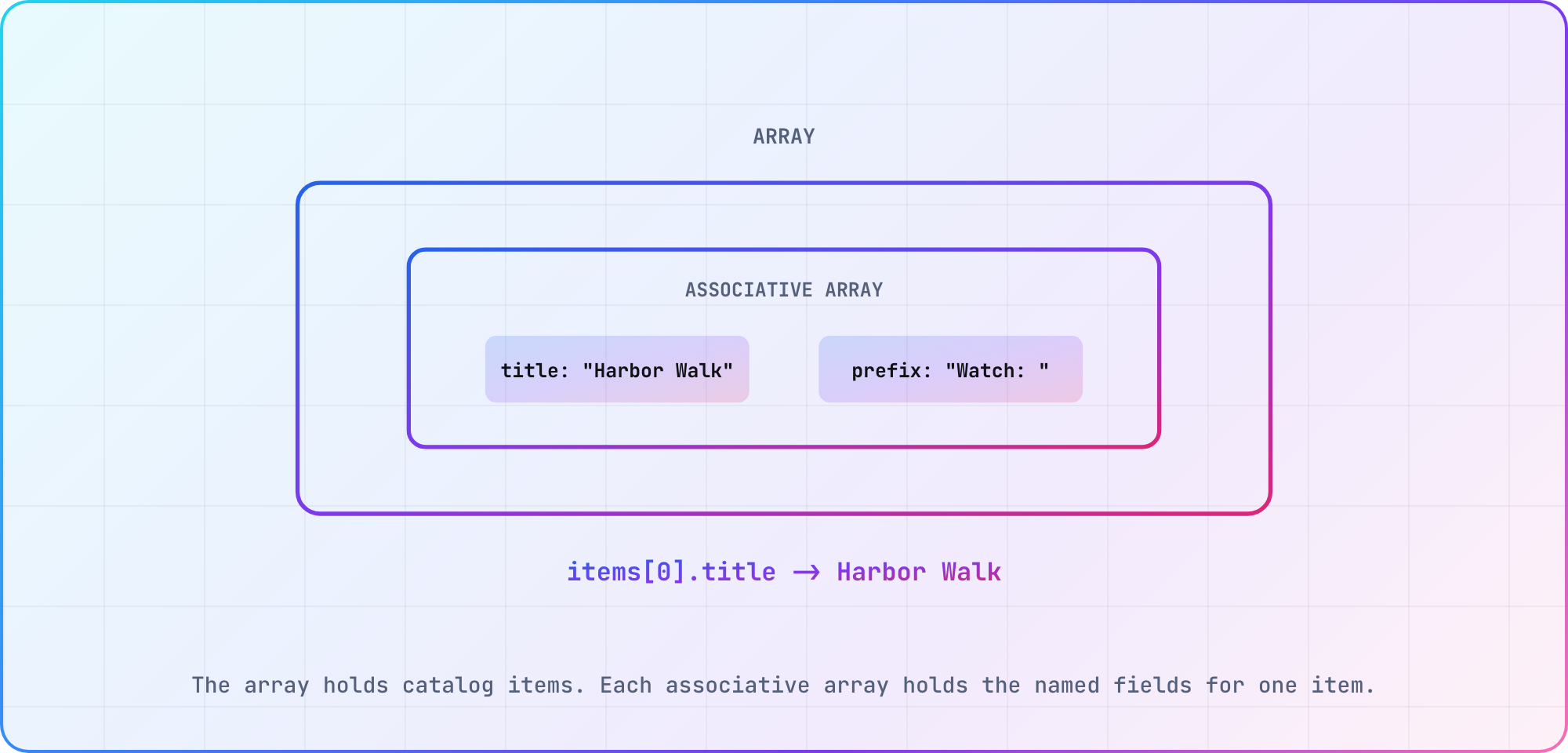
Illustrative data-shape diagram based on Roku's current BrightScript array and associative-array syntax.
Handle missing values before they become type errors
The BrightScript invalid value deserves an explicit branch. Roku's type reference explains that an object-returning operation can yield invalid, which a fixed string variable can't contain.
A deliberately failing assumption looks like this:
' Deliberate type mismatch example; don't use as application code
result$ = invalid
For the missing-result exercise, keep the receiving value dynamic:
result = invalid
if result = invalid then
    print "Choose a title"
else
    print result
end if
The expected branch prints Choose a title. There's no device-run claim attached to that output; it's the result to check when you execute the example.
I'd put this branch beside the operation that can return a missing result. Otherwise, the code that creates the ambiguity and the code that handles it gradually drift apart. While reviewing the change, ask what the value can contain at that line, rather than guessing from the variable's name.
For a richer payload, missing-value handling and field-type validation are separate jobs. Start with the explicit input contract below, then extend it deliberately when you introduce real catalog data.
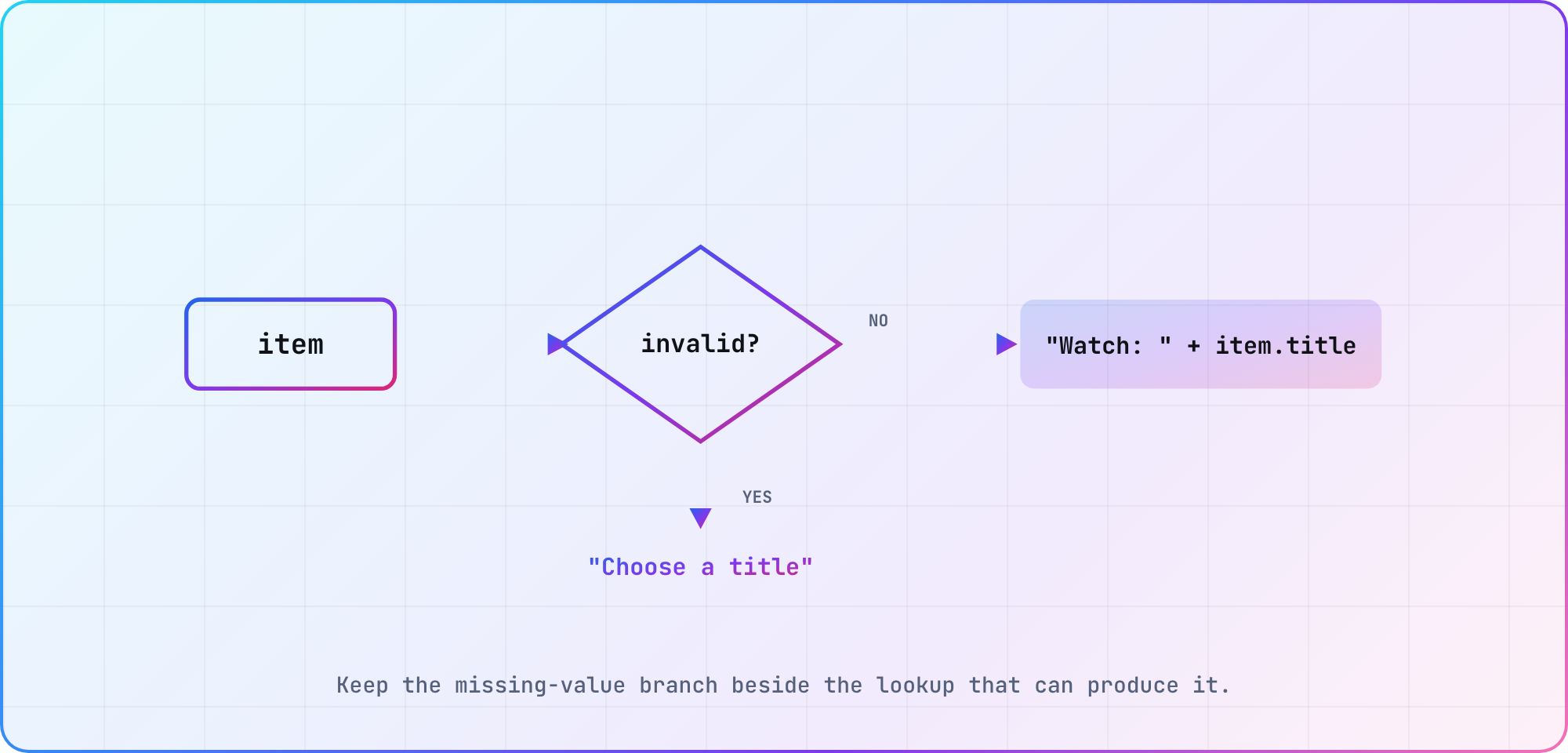
Illustrative control-flow diagram for the article's invented catalog example; the guard follows Roku's documented invalid behavior.
Build a small catalog-label exercise
Here's the complete transformation. Its input contract is intentionally small: item is either invalid or an associative array containing a string title. It doesn't attempt to validate an arbitrary service response.
function CatalogLabel(item as Dynamic) as String
    if item = invalid then
        return "Choose a title"
    end if
    return "Watch: " + item.title
end function

sub Main()
    item = { title: "Harbor Walk" }
    print CatalogLabel(item)
    print CatalogLabel(invalid)
end sub
The expected labels are Watch: Harbor Walk and Choose a title. Put the example into your development project's entry-point arrangement, taking care to replace or call from an existing Main rather than adding a competing entry point.
Try a second invented title and an embedded quotation mark. Record the code revision, device model, Roku OS version and actual output beside each input. Keep expected output and observed output in different columns in your notes; a copied expectation isn't test evidence.
Once those cases work, a worthwhile extension is a policy for an empty title. Decide the desired label first, add the input to your test notes, and then implement the behavior. That gives you a small change you can explain to the next developer who reads it.
Make the exercise safe for your Roku OS target
Roku dates optional-chaining support to OS 11.0. Its compatibility instruction says to specify that version or later when publishing a package that uses the feature. Our exercise keeps the missing-result branch explicit.
If you later shorten a lookup with optional chaining, include the minimum-OS decision in the same review. A tidy expression is much less useful when the person checking the patch has to discover its compatibility assumption elsewhere.
The Roku hello-world repository is useful inspectable sample code. Treat it as a historical example of project code, with its own age and choices, rather than a reason to adopt a particular UI architecture for a new application.
Keep your target list alongside the TV platform reference. When the language exercise grows into an app, use that list to plan cross-platform testing. For now, the useful finish line is modest: you can explain the input contract, predict both labels and record what your chosen Roku actually prints.
Frequently asked
Are BrightScript variable names case-sensitive?
No. Roku documents case-insensitive identifiers in its language reference. I'd still use the same spelling throughout an exercise. Review the declaration and later references together, then choose a naming style your team can recognize when it moves between Roku and other platform code.
Why does a BrightScript value become invalid?
One documented case is an object-returning operation that has no object to return. Check the return-value rules for the operation you're using. In this exercise, keep the receiving value dynamic and handle the missing result before building a display label from it.
Can I use optional chaining in BrightScript?
Yes, with the documented Roku OS 11.0 minimum. Record that compatibility choice alongside your package settings. If you're reviewing a change that introduces the syntax, check the intended device range as part of that review rather than treating it as a purely cosmetic rewrite.
How do I create a BrightScript array?
Use a square-bracket literal, as in items = ["Harbor Walk", "Night Train"]. Roku documents the literal syntax. For practice with BrightScript arrays, begin with a short invented collection, predict the item you intend to read, and record the observed result before expanding the exercise.
How do BrightScript associative arrays work?
In this exercise, an associative array groups named fields for one catalog item. Roku documents brace literals and quoted keys. Use { title: "Harbor Walk" } as the small starting shape, then state which fields your transformation expects before accepting a more complicated input.
How do I write comments in BrightScript?
Use an apostrophe for a BrightScript line comment. Roku's comment documentation distinguishes this from XML comments. Keep comments focused on the exercise's assumptions, such as invented input data or a deliberately failing example, so someone copying the snippet can see why it's there.
Keep reading
Tizen TV App Development: Build a Samsung Web App
Start Tizen TV app development with a Samsung web project, certificate setup and device debugging. Follow a clear workflow and verify it on your target TV.
webOS app submission: Prepare for LG Seller Lounge
Prepare a webOS app submission for LG Seller Lounge: package metadata, UX scenarios, self-check results and a clear plan for responding to review feedback.