webOS app submission: Prepare for LG Seller Lounge
Prepare a webOS app submission for LG Seller Lounge: package metadata, UX scenarios, self-check results and a clear plan for responding to review feedback.
You've got the IPK, the app launches, and you'd quite like to stop thinking about the release for a while. Fair enough. But LG's submission requirements include images, a UX scenario and a completed self-checklist alongside the package. Someone at the other end needs to work out how your app is supposed to behave, without having spent the last few months building it with you.
That's where I'd spend the final stretch before a webOS app submission. Give the reviewer a build they can identify and a journey they can follow. We'll put that together below, starting with the files and then picking up the remote.
What goes into your LG submission?
LG's approval guide spells out the package and supporting documents. I'd collect them in one release folder, even if different people own the individual pieces. You don't want the person uploading the app to have to guess which screenshot folder goes with which IPK (please spare them final-final-2).
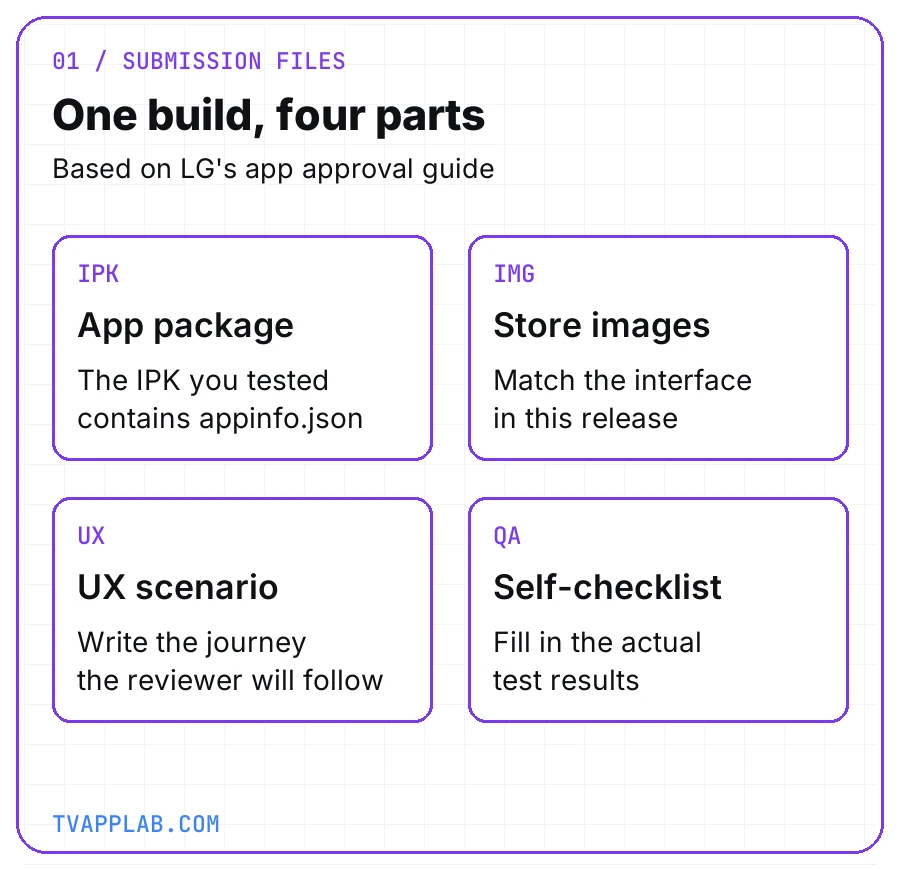
The submission materials LG lists, grouped around the same build. Keep appinfo.json inside the IPK; a loose copy in your release folder is only for your team's reference.
Here's one way to split the work. The owners are suggestions, so combine roles if you're a small team.
| Item | Suggested owner | What to check before upload |
|---|---|---|
| IPK | Developer | This is the build QA tested |
| appinfo.json | Developer | ID, version and referenced files match the package |
| Store images | Person managing the release | Screenshots match this version of the app |
| UX scenario | Product or QA | Someone else can follow the steps |
| Self-checklist | QA | Results come from the submitted build |
| Review reply, if needed | Person managing the release | Each reported issue has a specific response |
The review reply comes later if LG sends issues back. For the initial webOS IPK submission, concentrate on getting the build and its accompanying material ready together.
Check appinfo.json before you upload
Open the appinfo.json that belongs to the package you're submitting. LG's metadata reference puts it in the app's root directory, as a single JSON object. Here's a deliberately small example so we can talk about the fields without scrolling through an entire configuration:
{
  "id": "com.example.tv.catalog",
  "title": "Catalog Exercise",
  "type": "web",
  "main": "index.html",
  "icon": "icon.png",
  "version": "1.0.1"
}
These are example values, not a complete configuration or a tested app. Use your own ID and files, and check LG's full reference for the other properties your app needs.
Two fields deserve an extra look. LG says the app ID "cannot be changed once the app is published." Pick the identity you intend to keep. For version, LG's instruction is "To upload the app, you must increase the version number." A version you've already uploaded can't be uploaded again, according to the same reference.
If someone squeezes in one last fix, rebuild, check the version and test that package. I'd also record its checksum and source revision in the release notes. A filename alone won't tell your teammate whether you've quietly replaced the file underneath it.
Write the journey, then hand someone the remote
LG uses the UX scenario as a reference for its testers; you'll find the official template in LG Seller Lounge. Before filling it in, walk through your app's main task and write down what you pressed and what appeared.
For a video app, "check playback" leaves quite a lot to the imagination. Which title? Is the account signed in? Does it have access to that video? I'd rather give the reviewer a specific route, with the starting state written down before the first button press.
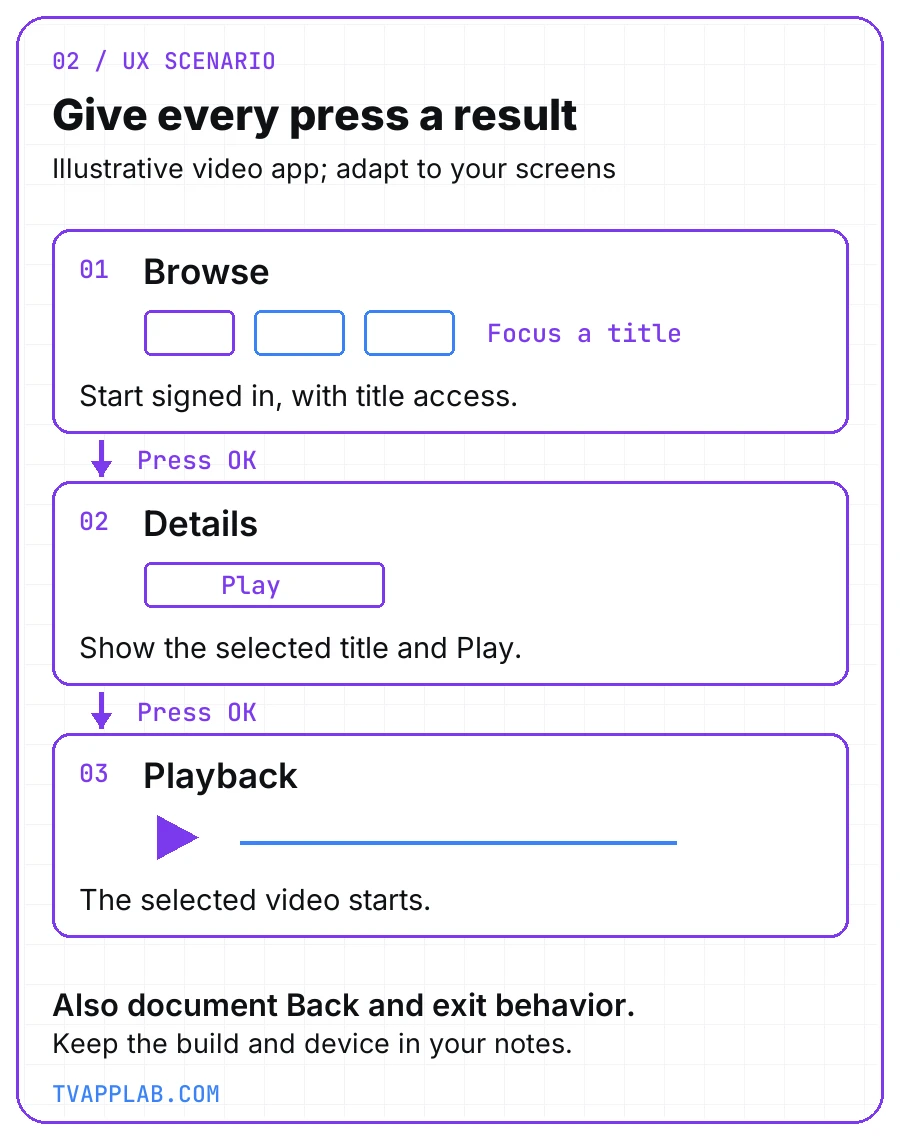
An example to adapt to your app, not an LG screen design or a prescribed navigation flow. Use the screen names and actions your build actually has.
For each step, collect the following:
Starting screen and account state:
Remote action:
Expected result:
Back or exit behavior:
Build and device checked:
Then ask a colleague to follow it while you keep quiet. Tempting to lean over and say, "Oh, you need to sign in first," isn't it? Put that instruction in the scenario. The same goes for review access and any content entitlement the journey depends on. Share credentials through the appropriate private review channel, and keep them out of screenshots and repositories.
Try that before polishing the document, while you've still got the remote in your hand and can check a missing step.
Fill in the self-checklist while you're testing
The webOS self checklist deserves a slot in the test run. LG's approval guide requires it to be "filled with your app's actual test results". Download the full form from the checklist page; the web page is a summary.
Read the mandatory and recommended sections separately. LG's UX criteria cover directional keys, OK and Back, pointer interaction and visible selection feedback. Loading feedback appears under recommendations. Keep that distinction in your test notes so a suggestion doesn't turn into a made-up certification blocker.
Also watch the model qualifications. The entry-page Back instruction on LG's current checklist is labeled for webOS23 through webOS25. Don't turn that into a claim about every webOS generation. Record the LG device you're testing, then follow the criteria that apply to your targets.
Keep a short observation beside each result: the screen, the action and what happened. If focus disappears after closing the player, write down the steps that got you there. "Navigation failed" gives the developer a whole app to search through; a repeatable sequence gives them somewhere to start.
And if you haven't run a check yet, leave it pending in your team's notes. There's plenty of time to write "pass" after you've watched it pass.
When LG sends an issue back
LG's approval process includes testing and resubmission when an app fails. Updates need approval too. I'd keep the response close to the reported issue: explain how to reproduce it, what changed, and how you checked the fix.
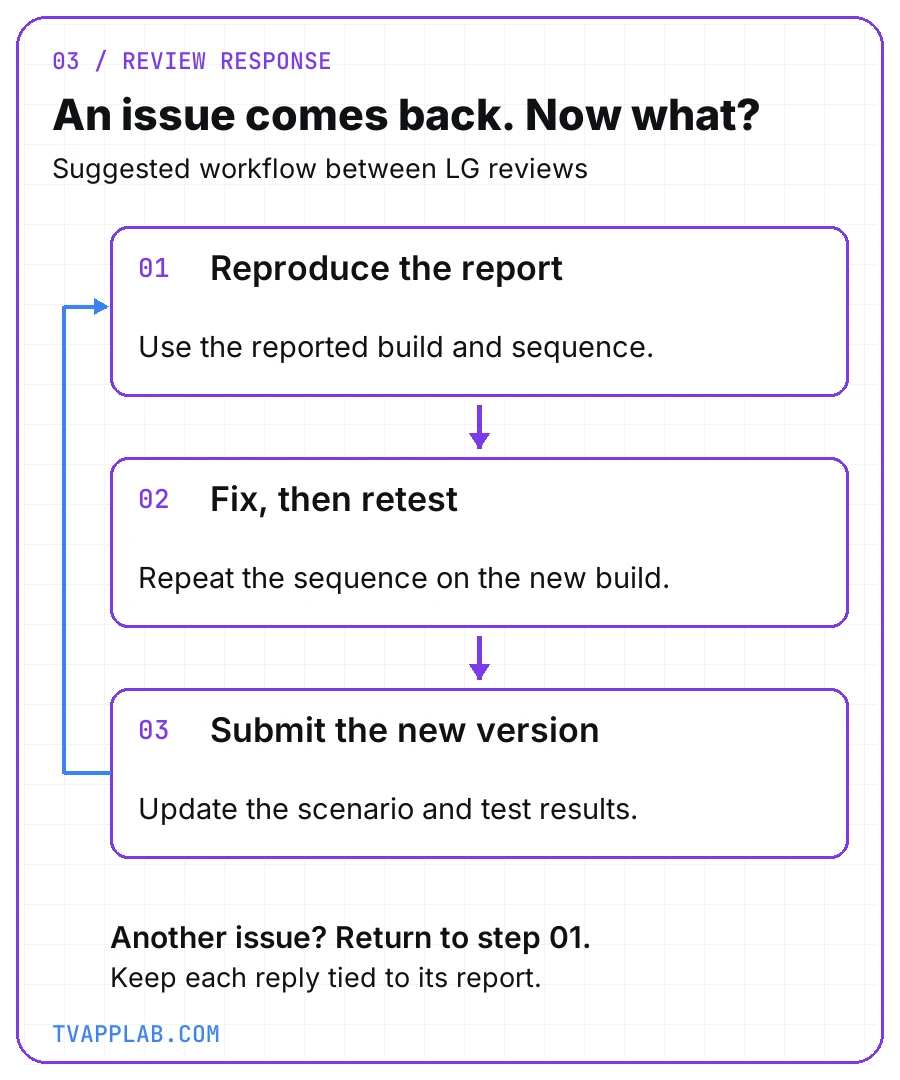
Our suggested work between reviews. LG documents the testing and resubmission process; the debugging steps are a practical way to prepare your response.
Suppose the report says Back leaves the viewer on a blank screen after playback. Check the reported sequence on the identified build, fix the behavior, then repeat the sequence on the new package. If your fix changes a screen or an instruction, update the screenshot or UX scenario too. Now the person answering LG has something more useful than "fixed in the latest build."
Remember LG's version rule before the next upload. Keep the new IPK, its version and the fresh test results together, and retain the previous submission so you can answer questions about it.
Shipping the same app elsewhere? You can coordinate testing across TV platforms, but keep the LG device and reproduction steps attached to the LG issue. A passing run on another platform won't explain what happened on that TV.
Before you open Seller Lounge, hand the release folder to someone who didn't assemble it. Can they identify the build, follow the scenario and find the results? Answer their questions in the files before you upload them.
Frequently asked
Is an IPK enough for a webOS app submission?
LG's submission guide also lists images, a UX scenario and the completed self-checklist. Collect those around the build you're uploading. I'd have the person handling the release open the folder and check that the screenshots and instructions describe that version of the app.
Can I change the app ID after publishing?
No. LG's appinfo.json reference says the ID stays fixed once the app is published. Check it before your first submission, then keep it consistent for updates. Use the version field to identify the next release; changing the ID isn't how you label a routine fix.
Do webOS updates go through approval?
Yes, LG's approval guide includes updates and later versions. Leave time in your release plan for that review. When preparing the update, keep the new package with its current instructions and test results so the person submitting it can see exactly what's ready.
Where does appinfo.json belong?
LG's metadata documentation places it in the app's root directory and specifies a single JSON object. Check the file in the package you're submitting. The small example above explains the identity fields; use the full reference when assembling your app's configuration and referenced files.
Should I test pointer interaction as well as directional keys?
Yes. LG's self-check guidance covers both, with applicability details in the full checklist. Try the relevant journeys with each input mode and record what happens. Don't let a successful run with the arrow keys stand in for pointer testing you haven't done yet.
Can I upload the same app version again?
LG's version documentation says you can't reuse a version you've already uploaded. Increase it for the next upload, then check that the new value belongs to the package you're submitting. Record that version beside the test results before handing the release to anyone else.
Keep reading
Roku certification checklist: the numbers Roku actually measures
A Roku certification checklist built from the numbers Roku actually measures, plus the tooling it hands you and what the criteria never say.
Connected TV release-readiness checklist: ship without getting rejected
A connected TV release readiness checklist for Roku, tvOS, Fire TV, Android TV, Tizen and webOS, with every requirement cited to its vendor doc.