Tizen certification: Seller Office and model groups
Tizen certification in Seller Office: package checks, required metadata, model group verification, release evidence, and a practical way to handle rejection.
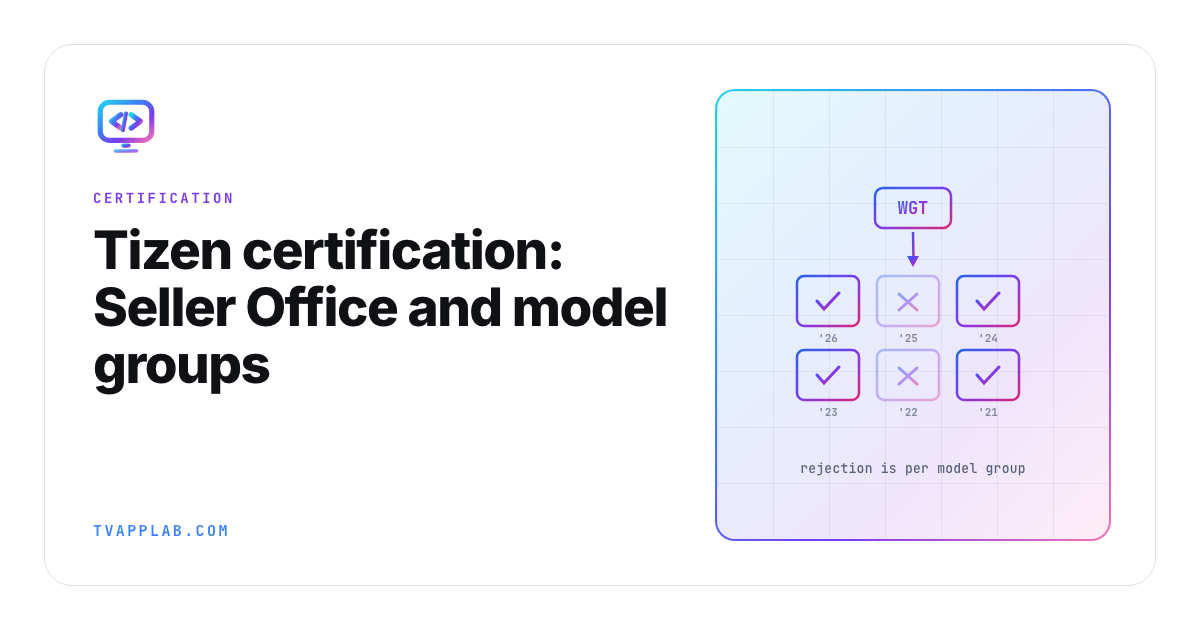
Samsung doesn't reject your app. Samsung rejects your app on a model group, which means the same build can be live on 2025 premium sets and sitting rejected on 2022 basic ones, at the same time, with two different statuses in the same dashboard.
That one mechanic explains most of the confusion around Tizen certification. Samsung does spell it out in its certification defects Q&A, but it's easy to miss before your first submission, so let's start there and work outward.
What a model group is
Samsung organizes its TV lineup into groups that look like 26TV_PREMIUM1, 25TV_STANDARD1, 23TV_BASIC3. Year, tier, index. Every group from the same year shares one platform version, per Samsung's TV Model Groups specification, and one web engine, per its Web Engine Specifications:
| Year | Tizen | Web engine |
|---|---|---|
| 2026 | 10.0 | Chromium M130 |
| 2025 | 9.0 | Chromium M120 |
| 2024 | 8.0 | Chromium M108 |
| 2023 | 7.0 | Chromium M94 |
| 2022 | 6.5 | Chromium M85 |
| 2021 | 6.0 | Chromium M76 |
| 2020 | 5.5 | Chromium M69 |
| 2019 | 5.0 | Chromium M63 |
| 2018 | 4.0 | Chromium M56 |
From the 2023 lineup on, OS upgrades blur that table. Samsung's Distributing Applications guide says that when you select a model group, "all Tizen versions applied to that model group will be included," and an upgraded group gets tested and released on its latest Tizen version.
When you request a release, you select which model groups it goes to. Samsung then runs a verification test per group. A defect that only shows up on a 2019 set rejects the 2019 group and leaves the rest alone.
This is more sensible than it first appears, given Samsung's engine spread runs from Chromium M47 to M130 across live model years. A single verdict across that range would be meaningless. But it does mean you should think of a Samsung submission as N submissions, and plan the test matrix accordingly.
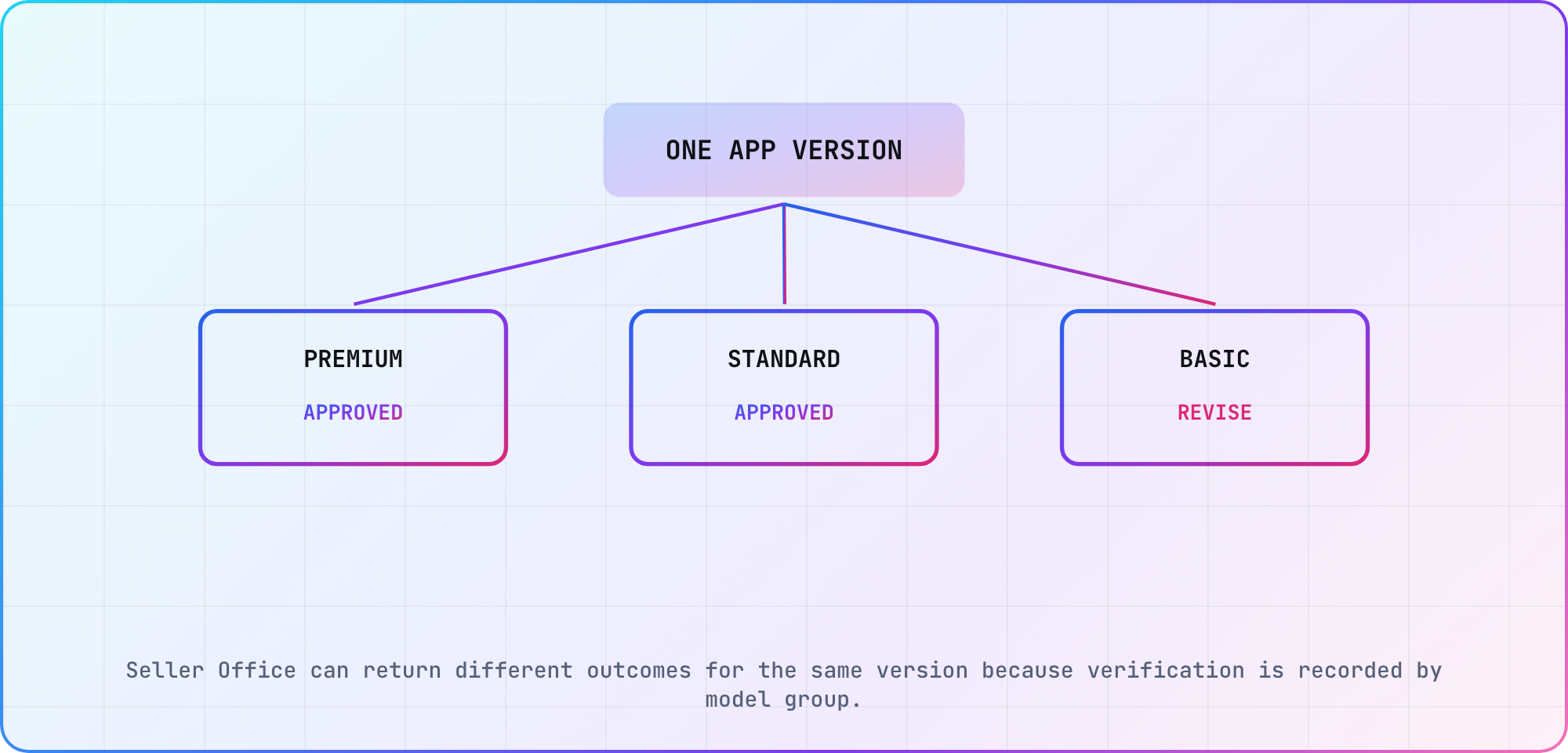
The statuses are illustrative. The point is that one application version can receive different verification outcomes across requested model groups.
The Tizen certification process, end to end
Samsung's Seller Office overview and certification process FAQ describe the workflow. In practice, it runs like this.
1. Create the application. In Samsung Apps TV Seller Office, you create a new application by entering an application name, application type, and default language. That generates your application ID, which is what everything else hangs off. If you're publishing outside the US, sort out partnership before any of this, because Samsung's certification FAQ is blunt about it: "You must be a member of a partner group to publish your application outside the United States."
2. Upload the package. Samsung TV apps ship as WGT (web apps, which is the overwhelming majority) or TPK (Tizen .NET apps). Build it in Tizen Studio with the matching TV Extension for your target years.
3. Clear the automated pre-test. Uploading triggers an automated examination of the settings and applied functions inside the package. This is a machine check, it's fast, and it catches configuration errors before a human is involved. Failures here are usually a wrong required_version, missing privileges, or a signing problem.
4. Register the metadata. This is more work than teams expect:
- Icons at 1920x1080 and 512x423
- Screenshots as JPG, maximum 500 KB each
- A UI description document as a PPTX. Samsung wants a PowerPoint walking their tester through your app. This isn't optional and a thin one slows you down
- Titles and descriptions per language, for every region you serve
- Service regions, billing details, feature specifications
- Test accounts in Verification Info if your app needs a login. Samsung's Entering Application Information guide says "You must provide at least 1 test account for each model group that your application supports," because it tests every requested group at the same time
5. Request release and select model groups. You pick which groups get this version.
6. Samsung reviews and verification-tests. Human review plus testing per group. Samsung's own wording, from its Distributing Applications guide: the application "may be rejected during the review process, and if a flaw is found in the application during the verification process, it may not be released."
7. Distribution. Approved groups go live. Rejected or failed groups don't get this version, and you can't select them for a new release until their defects are marked resolved under Defect Resolve. If you changed code, that means a new version; if you fixed the problem without touching the package, Samsung's defects Q&A lets you resubmit the same version number.
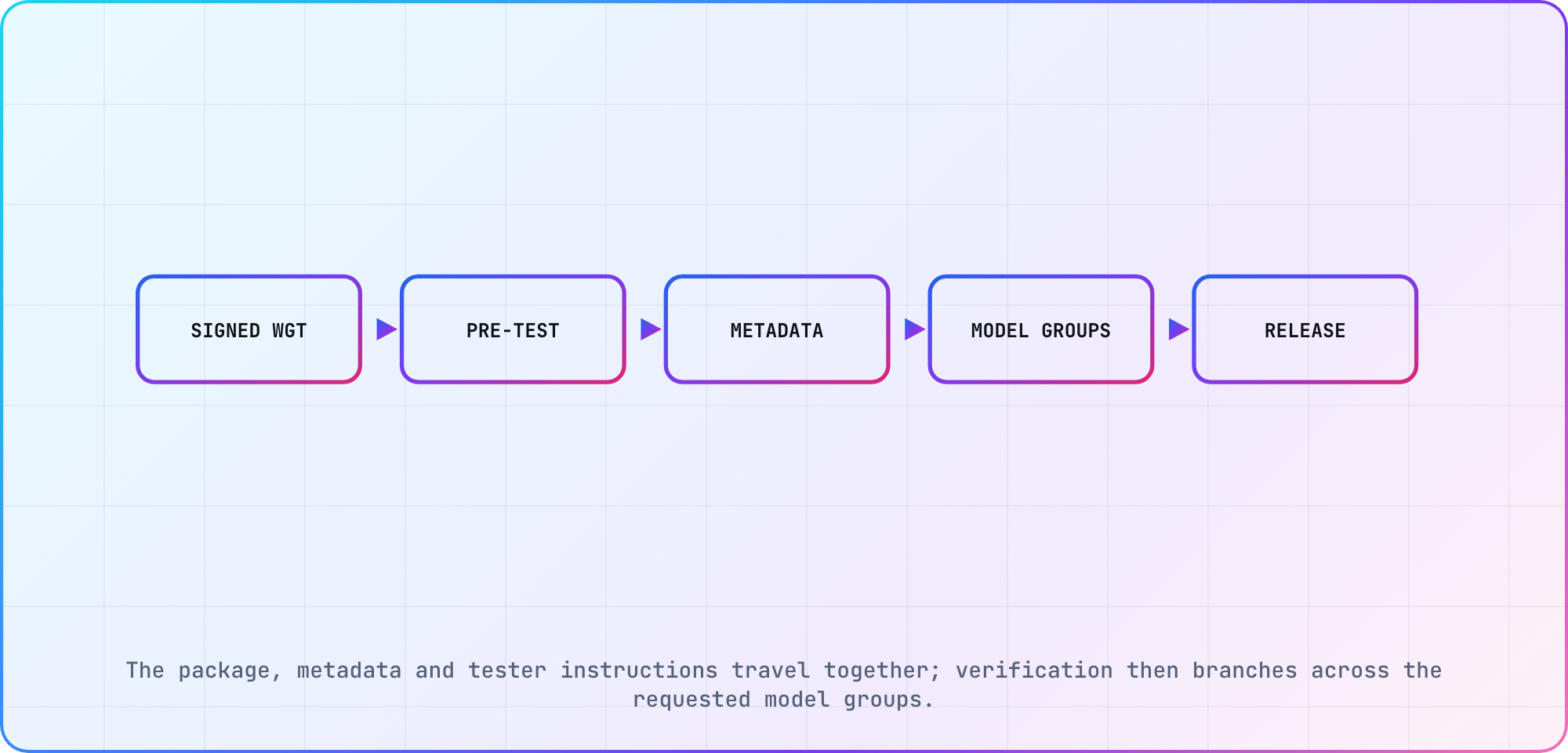
This is a process map based on Samsung's Seller Office guidance. Exact screens and requested materials can vary with application features and regions.
Updates repeat the whole loop. Upload a new package, re-verify, re-release per group.
The required_version trap
In your config.xml:
<tizen:application id="ABCDEFGHIJ.YourApp"
                   package="ABCDEFGHIJ"
                   required_version="4.0"/>
required_version is the platform floor for installation. Set it to 4.0 and a 2017 set (Tizen 3.0) can't install your app.
The trap is inconsistency between this value and the model groups you request. If required_version says 4.0 but you only requested release on 2024 and 2025 groups, you've declared support for six years of hardware you aren't shipping to. If it says 6.0 but you requested 2019 groups, the release doesn't make sense and you'll hear about it.
Decide your floor once, write it in the README, and make the two agree.
Timelines
Samsung doesn't publish review timelines, and I would treat any specific number you read online with suspicion. What you can plan around:
- The automated pre-test happens before release review and catches package or configuration problems early
- Human review and verification timing depends on tester availability, review rounds, requested model groups, regions, and application features
- Samsung does not publish a guaranteed turnaround, so a fixed day estimate should not appear in a launch promise
- A rejection adds another correction and verification round for the affected release scope
The practical scheduling advice: submit to fewer model groups first. Get 2023 through 2026 approved and live, then widen. A 2019-only defect won't hold up your 2025 release, since Samsung releases to the groups that pass, but every group you request is another set of TVs to pass (and, if your app has a login, another test account), and a defect keeps this version off that group until you fix it and resubmit.
What gets Tizen apps rejected
The recurring pattern, in rough order:
Focus bugs. Every interactive element must be reachable by D-pad, every focusable element must show a visible focus state, and there must be no traps. It's the first thing I'd check before any TV submission, Samsung included.
Low-memory failures on basic-tier sets. Samsung doesn't publish per-year RAM figures for apps in its general specifications, but its Other Features Q&A says apps installed through Tizen Studio for testing "can use a maximum 120 MB of memory," and that a stability monitor has terminated processes to free memory since the 2017 model groups. Profile against that cap on the oldest, cheapest model in your target range. An app that's comfortable on a 2025 premium panel can die on a 2019 basic one, and it will be rejected on that group only.
DRM and playback. Samsung's general specifications list Widevine Modular (L1) on every lineup from 2016, and they now say PlayReady is "deprecated from Tizen TV and no longer recommended for new models." webapis.avplay behavior, especially around seek and buffering callbacks, has changed across platform versions. This is the most version-sensitive code you'll write.
Lifecycle. Suspend and resume on older firmware doesn't always fire what you expect. Resuming into a dead player is the classic Tizen bug and it looks like a crash to a tester.
Metadata problems. A screenshot over 500 KB. A missing PPTX. Test account credentials left out of the UI description, which Samsung's certification FAQ says "causes application certification to fail with critical defects." All trivial, all cost you a cycle.
Before you submit
- App runs on the oldest model group you targeted, on real hardware
-
required_versionmatches the model groups requested - Partner-group membership in place if you're publishing outside the US
- At least one test account per requested model group in Verification Info, if the app needs a login
- Memory profile stable across 30 minutes of navigation on a basic-tier set
- Every element D-pad reachable, every focusable element visibly focused, no traps
- DRM handshake verified per target generation
- Suspend and resume tested, player recovers
- Icons at 1920x1080 and 512x423
- Screenshots JPG, each under 500 KB
- UI description PPTX written for a tester who has never seen your app
- Titles and descriptions localized for every requested region
- Layout targets 1920x1080. Every Samsung TV renders apps at 1080p, including the 8K ones
The mental model
Treat a Samsung submission as a set of parallel submissions, one per model group, each tested independently on that group's own TVs (groups from the same year share a Chromium version, and an upgraded group is tested on its newest Tizen version). Once you hold that picture, the odd bits stop being odd: why the PPTX exists (a human tester needs a map), why rejection statuses look inconsistent (they're per group), why "it works on my TV" means nothing (your TV is one group of the several you targeted).
Start narrow, get live, then widen. Samsung releases to whichever groups pass, so one 2019 defect won't hold up the launch, but it will keep 2019 owners waiting while you fix it and resubmit for that group.
Frequently asked
How long does Samsung TV app certification take? Samsung does not publish a guaranteed certification time. Plan around the stages you control: a package that clears pre-test, complete metadata, usable tester instructions, stable test accounts, and evidence on requested model groups. Tester availability and additional review rounds can change the calendar, so keep buffer outside the announced launch date.
Why was my app rejected on some model groups but not others? Because Samsung tracks verification against requested model groups. A defect isolated to an older basic group can produce a different result from a newer premium group for the same application version. Read the affected group, test environment, and rejection evidence before changing shared code or resubmitting unaffected coverage.
What package format does a Samsung TV app use? Samsung TV web applications use a signed WGT package; Tizen .NET applications use TPK. Build and sign with the appropriate Tizen Studio TV tooling, preserve the exact release artifact, and attach its package identity to the pre-test and model-group verification evidence.
What does required_version do?
It sets the minimum Tizen platform version that can install the package. A floor of 4.0 excludes Tizen 3.0 devices. Keep the value aligned with requested model groups, tested browser engines, privileges, and player behavior. A low value is a support claim, so do not use it merely to maximize discoverability.
What assets does Seller Office require? Seller Office asks for application metadata, visual assets, localized copy, service regions, feature information, and tester guidance appropriate to the submission. The UI description should let an outside tester reach important journeys and understand expected behavior. Recheck Samsung's launch checklist for current dimensions, formats, limits, and region-specific fields before upload.
What are the most common Tizen rejection reasons? The risky areas are D-pad focus and visible focus states, low-memory behavior on basic sets, DRM and AVPlay differences by engine generation, lifecycle recovery, account access, and incomplete tester instructions. Turn each into a named pre-submission check on the oldest requested group instead of treating rejection causes as a generic checklist.
Sources
- Samsung, Seller Office overview and certification process FAQ
- Samsung, launch checklist and UI description guidance
- Samsung, TV Model Groups and Web Engine Specifications
- Samsung, general specifications
Related: Samsung Tizen versions and supported model years for the version mapping, How to test an app on a Samsung TV (Tizen) without buying one, and the Connected TV release-readiness checklist for the cross-platform pre-flight.
Keep reading
Remote Smart TV Testing Without a Local Device Lab
Compare remote smart TV testing by exact hardware coverage, interaction depth, private-network access and evidence capture, then keep a small local smoke kit.
Samsung Tizen TV Test Automation: Limits and Workarounds
Automate Samsung TV build, signing, install and evidence capture while keeping device focus and playback verdicts outside unsupported official UI automation.