Connected TV release-readiness checklist: ship without getting rejected
A connected TV release readiness checklist for Roku, tvOS, Fire TV, Android TV, Tizen and webOS, with every requirement cited to its vendor doc.
Roku will reject your app if the home screen isn't fully rendered within 15 seconds. Not "flag it," not "suggest you look at it." Rejected, measured against a signal beacon, written down as criterion 3.2.
I open with that because it sets the right expectation for the whole exercise. These aren't style guidelines that a sympathetic reviewer might wave through. Several of them are pass/fail gates with stopwatches attached, and every store has its own set, expressed in its own vocabulary, buried in its own portal.
The rejection loop is what actually costs you. A bounce isn't one bug fix, it's a bug fix plus a resubmission plus another trip through someone else's queue. Miss three things across three stores and your launch date moves by a month, which is how a "we're basically done" becomes a difficult conversation.
So here's the pre-flight, ordered by what genuinely gets apps bounced rather than by what looks tidy in a spreadsheet. Every requirement is cited to the vendor doc it comes from, and where something is widely repeated but not actually in the documentation, I say so, because I've been caught by that myself.
1. Performance budgets, the numeric gates
Roku publishes hard thresholds and enforces them. Treat these as your strictest common denominator and you'll clear everyone else comfortably:
- Home screen fully rendered within 15 seconds of launch (Roku 3.2)
- Playback begins within 8 seconds of the user pressing play (3.6)
- Scene-to-scene transitions complete within 3 seconds (3.3)
- Remote button presses and tile navigation respond within 250 ms (3.5)
- A loading indicator appears for anything over 3 seconds, and every user request gets a response within 10 seconds (3.4)
- Package under 4 MB on Roku (3.7)
Measure on your worst device, not your desk. A Roku Express and a Fire TV Stick Lite are the machines that decide whether you pass, and neither resembles the Apple TV 4K you've been developing against.
- Memory profile checked on the lowest-spec target in every platform family
- No unbounded growth across 30 minutes of navigation (the classic Tizen and webOS low-memory rejection)
- Frame rate holds during grid scroll on the cheapest stick you support
2. Remote, focus and transport controls
The single most common source of "works on my machine" rejections, because focus bugs are invisible until somebody navigates the way you didn't.
- Every interactive element reachable by D-pad alone, no touch-only affordances (Google requirement TV-DP, and the same expectation everywhere else)
- Every focusable element shows a visible focus state
- No focus traps. From any screen you can always get back out
- Back returns to the previous screen, and from the top level exits to the platform home
- No orphaned focus after a modal, dialog or player closes
- During playback, the D-pad center button pauses and resumes, and left and right rewind and fast-forward (Google TV-PC). Easy to miss, trivially testable, and genuinely broken in a lot of shipped apps
- If your app requires a game controller, all functionality is navigable with standard controller keys, and you declare it with
<uses-feature>(Google TV-DK and TV-GP) - webOS only: the app works with the Magic Remote pointer as well as the D-pad. LG users have a cursor, and an app built only for focus navigation feels broken the moment somebody waves the remote
- Fire TV only: remote only. Amazon's docs are explicit that Fire TV doesn't support mouse or keyboard input and that touch events aren't available
3. Playback, DRM and captions
- Play, pause, seek, fast forward and rewind all correct, including at content boundaries
- Trick-play thumbnails for VOD longer than 15 minutes (Roku 4.7)
- DRM handshake verified per platform: Widevine and PlayReady on Tizen, webOS and Android, FairPlay on tvOS
- Audio passthrough correct for your codecs, including through receivers
- Captions and audio description provided where required by law, with compliance to applicable accessibility law and global accessibility settings (Roku 4.8)
- Your app follows the user's global caption settings, and the player's Options menu supports On, Off, On instant replay, and On mute (also 4.8). Go and look at your player. The last two are usually missing
- Network loss mid-playback recovers into an error state rather than a black screen
- Resume position survives an app kill and relaunch
- Live and VOD both tested if you ship both, because they fail differently
4. Deep links and lifecycle
- Deep linking supported for every media type you expose (Roku 5.1)
- Direct to Play implemented, so voice launches land on content rather than your home screen (5.2)
- You don't deep link into other apps or push users out of yours (5.3)
- Cold start, warm start, suspend and resume all tested. Resuming into a dead player is the classic Tizen lifecycle bug
- The system screensaver isn't overridden (Roku 4.5)
5. Store metadata and assets
Boring, and responsible for more bounces than anything on this list except focus.
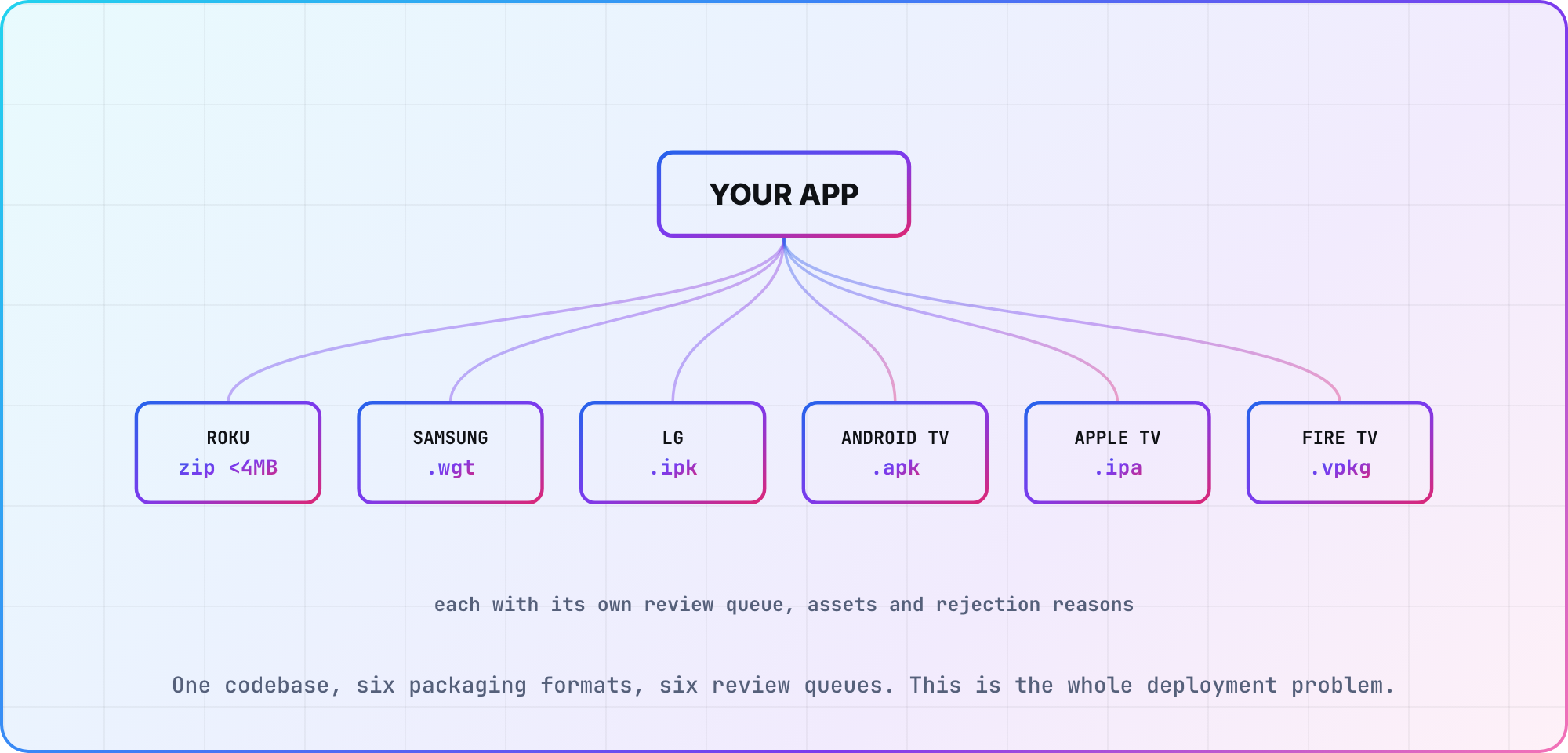
- Roku: splash screens at FHD 1920x1080 and HD 1280x720, no transparency (6.4)
- Samsung: icons at 1920x1080 and 512x423, screenshots as JPG under 500 KB each, and a UI description document as a PPTX. Samsung genuinely wants a PowerPoint walking their tester through your app
- LG: the two documents LG will reject you for omitting. A UX Scenario describing how the app works, which LG says "will be a reference for LG testers to test your app," and a Self-Checklist, where it's "mandatory to upload this checklist filled with your app's actual test results." A thin self-checklist is a bounce. LG doesn't publish image specifications on its approval-process page, so pull the current ones from Seller Lounge rather than from a blog post
- Android TV: a 320x180 full-size banner and at least a 160x160 xhdpi app icon as launcher icons (TV-LB), plus the
ACTION_MAINintent with categoryCATEGORY_LEANBACK_LAUNCHERon your main TV activity (TV-ML) - Content rating set, per store
- Privacy policy URL live and reachable
- Descriptions localized for every region you requested
6. Platform-specific triggers
- Roku: transactional apps use Roku Pay (2.1), and sign-in happens on device rather than on an external web page (2.2). Then check the streaming-hour gates, because they switch on as you grow:
| Threshold | Requirement | Criterion |
|---|---|---|
| 1M hours/month, apps that require login | Automatic Account Link | 4.2 |
| 5M hours/month | Voice controls | 4.11 |
| 5M US, or 1M international, from Oct 1 2026 | Continue Watching | 4.13 |
| 5M US, from Oct 1 2026 | Instant Resume | 4.14 |
| 10M hours/month, SVOD | Instant Signup | 2.3 |
- Samsung: you submit a WGT package (or TPK for native), clear an automated pre-test of the package settings, then select target model groups. Verification runs per model group, so your app can go live on 2025 sets while sitting rejected on 2022 ones. Make sure
required_versioninconfig.xmlagrees with the groups you actually requested - LG: three test stages, pretest for information accuracy, then function test, then content test. Updates need their own approval, and LG warns that unapproved changes can get an app removed without notice
- Android TV: from August 1, 2026 your app must support both 32- and 64-bit architectures and comply with 16 KB page size requirements (TV-G6), and
minSdkVersionmust be 31 or lower to cover commonly used devices (TV-PS) - Fire TV: free developer account, app added in the Developer Console. Cloud App Program updates take up to 5 business days to appear. If you're targeting Vega OS, the binary is a
.vpkgand Amazon requires that "you must test your app on a Fire TV device before submitting to the Amazon Appstore," even though a Vega Virtual Device exists - tvOS: App Store Review Guidelines as normal, TestFlight for beta
- Vizio: a partner-program review, and expect it to be a manual conversation rather than a portal
7. Before you press submit
- Run Roku's Static Analysis and App Behavior Analysis tools. Roku's own wording is that developers are "expected" to use them
- Crash reporting wired and confirmed receiving events from a real device
- Analytics wired, so day one tells you something
- Version and build numbers incremented everywhere
- Someone who didn't write the app has navigated it with the remote only, cold, for 15 minutes
- The oldest device you claim to support has actually run this build
What isn't a requirement, whatever you've read
I want to flag these, because I had several of them in an earlier version of this checklist and they're wrong.
Nobody publishes a contrast ratio. You will see "4.5:1 on actionable elements" quoted as a TV certification rule. It isn't in Roku's criteria, and none of the other vendors checked here state a ratio. Readable 10-foot UI is still the right thing to build, and low contrast will cost you reviews rather than a rejection.
LG doesn't publish a review timeline. The commonly quoted "5 to 10 business days" appears nowhere in LG's approval-process documentation, which describes the three stages and no timeframes at all.
Roku doesn't publish one either. Its certification overview covers the preparation expected of you and states no turnaround.
So how should you plan? Treat every store's review as an unknown of at least a week, assume at least one rejection cycle on your first submission to each, and get the numeric gates right up front, because those are the only part of this you fully control.
Working the connected TV release readiness checklist
Two habits make this much cheaper.
First, run the numeric gates continuously rather than at the end. Startup time and transition latency drift a little every sprint and then blow a threshold in the exact week you planned to submit.
Second, submit to Roku first. Not because it's the biggest platform for you, but because it's the only store that tells you its thresholds in advance and gives you tools to measure them. Clear Roku's stopwatch criteria and the rest of your submissions get noticeably quieter.
Frequently asked
What is the most common reason TV apps get rejected? Focus and navigation bugs: an element unreachable by D-pad, a missing focus state, a focus trap, or a back button that doesn't go where the user expects. Store metadata mistakes are a close second and are usually the faster fix.
Which store is strictest? Roku, because it publishes numeric thresholds and measures them. That also makes it the useful one to clear first.
How long does TV app certification take? Neither Roku nor LG publishes a review timeline, and Samsung and Amazon don't either. Plan for at least a week per store and at least one rejection cycle on a first submission, rather than around any specific figure you read.
Do app updates need re-certification? Yes, on every platform here. LG is explicit that unapproved changes can get an app pulled without notice, and Samsung re-runs verification per model group on each new package.
What should I test on before submitting? The cheapest device you claim to support. A Roku Express and a Fire TV Stick Lite will fail the performance gates that an Apple TV 4K hides from you.
Is there a contrast requirement for TV apps? Not in the certification criteria of the platforms checked here. Design for legibility at 10 feet regardless, but don't expect a documented ratio to pass or fail against.
Sources
- Roku, certification criteria, certification overview and pre-certification tests
- Samsung, application publication process
- LG, app approval process
- Google, TV app quality guidelines for all TV- requirement IDs
- Amazon, submitting your app to the Appstore and Vega documentation
Last verified: August 2026. Two dated requirements land soon: Android TV's 64-bit and 16 KB page size rules on August 1 2026, and Roku's Continue Watching and Instant Resume obligations on October 1 2026.
Related: Roku certification checklist for Roku in depth, Samsung Tizen certification for the model-group review loop, and The TV app deployment workflow for packaging per store.
Keep reading
CTV Video-Start Benchmarks: Targets and Test Method
Define tap-to-first-frame consistently, segment TV devices into cohorts and publish median/p95 video-start results without inventing cross-platform averages.
Android TV Emulator Setup and Troubleshooting
Set up an Android TV emulator in Android Studio, choose a compatible system image and diagnose launch or acceleration problems before testing on a real TV.